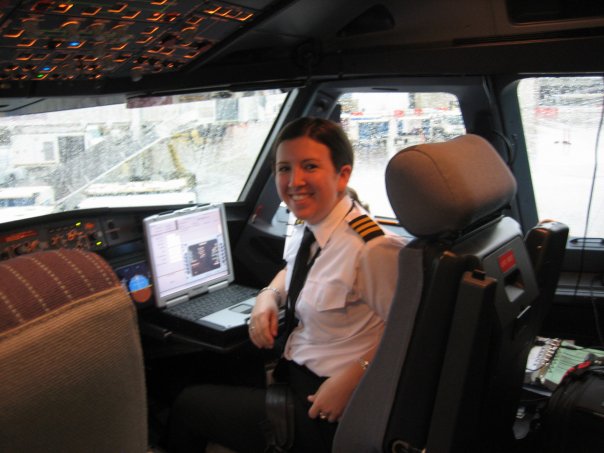
Greetings! I have great news! As of May 29th I’m a full-fledged first officer once again! I passed my proficiency check in the full-flight simulator and flew 15 hours on the line. After those 15 hours I had to take a line check, as specified by the new “pro pilot guidelines.” As a result of the Colgan crash in Buffalo, the FAA instituted new rules for airlines with low-time pilots. I already meet the “time in type” requirement but since I have not flown with the airline for 13 months I’m still part of the program.
Just mention “line check” to most pilots and they break out into a cold sweat. But if you’re proficient in the aircraft, always abide by your standard operation procedures (SOPs) and keep your charts and manuals updated, a line check won’t be so stressful. The problem lies when pilots suffer a “brain dump” after their yearly training. They forget their limitations, have a tendency to not follow SOPs and will have a stack of chart revisions in the bottom of their flight back. There’s a simple solution: don’t dump all that useful knowledge the day after your proficiency check!
My personal flying philosophy is “fly like you’ve trained. Fly the same way every day, and when something goes wrong, you’ll perform how you’ve been trained to perform.” The best pilots I’ve flown with are the ones that follow their SOPs. There shouldn’t be any surprises in the cockpit, at least within the crew. SOPs are designed so that, even if you just met your captain five minutes ago, you can still safely operate a flight.
Enough soap box!
Currently I’m sitting at TPA, my home airport (for now!). Tomorrow is June 1st and I have a reserve line this month. When you’re on reserve you are on call during a certain time period (this month it’s 0200-1600) and the company will assign you flights that have not been covered. Most of the time you’re assigned flights that weren’t covered by scheduling during the initial bid period and sometimes you are filling in for a pilot that’s called in sick. Since I have to work in the morning I’m taking a flight this afternoon to ACY.
I was scheduled to be on reserve the 1st and 2nd, but have already been assigned a trip for those two days. I called crew scheduling this morning just to make sure my line check/training paperwork had been put through (making me available to fly the line). They said it had and that they already had a trip for me! Technically they can’t call me on my day off. They would have called at 2am tomorrow morning, though! So I’m glad it worked out.
Tomorrow I will be flying ACY-BOS-FLL-DTW, starting at 0930 and getting into DTW around 1930. I overnight in DTW then fly one early-morning leg back to ACY at 0600. I can even get back to Tampa the same day! I’m so happy to be back flying. Hopefully the trip goes smoothly! Details at 11 ;)
Monday, May 31, 2010

Sunday, May 16, 2010
SOPs and SMAC
We've been very busy for the past week, so I apologize for not updating! Today was my first procedures training FTD after three wonderful days off.
Unlike in the systems integrated training from last week, this week's FTDs place emphasis on flows, checklists, call outs and approach procedures. Today my partner and I each performed an emergency descent, a RNAV approach and a NDB approach. RNAV and NDB approaches are flown almost exactly the same in the A320, using what's called the APP NAV strategy.
With the APP NAV strategy the aircraft actually uses raw data (i.e. the NDB signal) as a backup to GPS waypoints. Basically, the NBD final approach fix is treated the same as the GPS waypoint FAF on the RNAV approach. You monitor raw data while performing the NBD approach but rely on the airplane's GPS and IRS navigation to shoot the approach. Just follow the flight directors and VOILA, you're there.
Actually, we're taught the fly the whole thing on autopilot until the runway environment is in sight! Then you can click off the autopilot and land the airplane. If you don't see the necessary requirement to land before reaching the approach minimums, you initiate a go-around by moving the thrust levers to the TOGA detent. The A320 will do the entire go-around without any additional pilot input. If you wish to fly the published missed approach you press the heading bug to tell the autopilot you wish it to fly the missed and it will fly to the altitude, fix and hold right there until you tell it otherwise. Lazy? yes. Neat? TOTALLY.
Tomorrow we'll be concentrating more on the correct call outs and practicing the approach briefing. Call outs are crucial to following standard operating procedures (SOPs) and help with situational awareness for both crew members. The newest and most critical is the "stable/unstable" call out. More about that tomorrow!
Unlike in the systems integrated training from last week, this week's FTDs place emphasis on flows, checklists, call outs and approach procedures. Today my partner and I each performed an emergency descent, a RNAV approach and a NDB approach. RNAV and NDB approaches are flown almost exactly the same in the A320, using what's called the APP NAV strategy.
With the APP NAV strategy the aircraft actually uses raw data (i.e. the NDB signal) as a backup to GPS waypoints. Basically, the NBD final approach fix is treated the same as the GPS waypoint FAF on the RNAV approach. You monitor raw data while performing the NBD approach but rely on the airplane's GPS and IRS navigation to shoot the approach. Just follow the flight directors and VOILA, you're there.
Actually, we're taught the fly the whole thing on autopilot until the runway environment is in sight! Then you can click off the autopilot and land the airplane. If you don't see the necessary requirement to land before reaching the approach minimums, you initiate a go-around by moving the thrust levers to the TOGA detent. The A320 will do the entire go-around without any additional pilot input. If you wish to fly the published missed approach you press the heading bug to tell the autopilot you wish it to fly the missed and it will fly to the altitude, fix and hold right there until you tell it otherwise. Lazy? yes. Neat? TOTALLY.
Tomorrow we'll be concentrating more on the correct call outs and practicing the approach briefing. Call outs are crucial to following standard operating procedures (SOPs) and help with situational awareness for both crew members. The newest and most critical is the "stable/unstable" call out. More about that tomorrow!
Saturday, May 8, 2010
I owe you a post!
I'm sorry that I haven't been updating daily, but even ground school is exhausting! I have a day off today, however! Today's agenda is to take advantage of the great weather and study by the hotel pool.
Tomorrow I start SITs. In the SIT we practice operating the aircraft systems in situations more like what we'll be seeing on the line. I hope I do well! It's been 18 months since I've been in the cockpit so I feel out of practice. After I've gotten enough UV rays today I'll come back inside to practice my flows on the cockpit posters I have in my room.
I'm going to avoid discussing our union issues in the blog, as I'd rather keep my mind on training. I will say, however, that I truly hope the union and the company come to an agreement before a strike -- striking keeps us out of the cockpit and keeps the company from making money; it's not good for either party. At the same time, however, we won't sacrifice our quality of life. You can read the Airline Pilots Association's press release here.
The other day in class we discussed landing distance multipliers and factors that necessitate an increase in approach speed. After the Southwest Airlines runway overrun at Midway airlines have focused on ensuring adequate runway distance available.
We spent a decent chunk of time on a new flow chart that we can use to decide how many knots we need to add to our approach speed, as well as any increases in runway distance (called multipliers). A small change in aircraft configuration due to a malfunction or even a strong crosswind can increase landing distance by 10% to 35%.
Our normal Vapp in the A320 is around 123-126 knots. Some malfunctions such as inoperative flaps will significantly increase Vapp. Approach speed sometimes must be increased up to 20 knots.
The procedure keeps you aware of how the malfunction (or weather) can affect your landing speed and distance, something that pilots flying any type of airplane, from a C150 to an A380, could definitely apply.
Another major safety initiative highlighted in our training is stabilize approaches - but I'll save that for another blog post!
Tomorrow I start SITs. In the SIT we practice operating the aircraft systems in situations more like what we'll be seeing on the line. I hope I do well! It's been 18 months since I've been in the cockpit so I feel out of practice. After I've gotten enough UV rays today I'll come back inside to practice my flows on the cockpit posters I have in my room.
I'm going to avoid discussing our union issues in the blog, as I'd rather keep my mind on training. I will say, however, that I truly hope the union and the company come to an agreement before a strike -- striking keeps us out of the cockpit and keeps the company from making money; it's not good for either party. At the same time, however, we won't sacrifice our quality of life. You can read the Airline Pilots Association's press release here.
The other day in class we discussed landing distance multipliers and factors that necessitate an increase in approach speed. After the Southwest Airlines runway overrun at Midway airlines have focused on ensuring adequate runway distance available.
We spent a decent chunk of time on a new flow chart that we can use to decide how many knots we need to add to our approach speed, as well as any increases in runway distance (called multipliers). A small change in aircraft configuration due to a malfunction or even a strong crosswind can increase landing distance by 10% to 35%.
Our normal Vapp in the A320 is around 123-126 knots. Some malfunctions such as inoperative flaps will significantly increase Vapp. Approach speed sometimes must be increased up to 20 knots.
The procedure keeps you aware of how the malfunction (or weather) can affect your landing speed and distance, something that pilots flying any type of airplane, from a C150 to an A380, could definitely apply.
Another major safety initiative highlighted in our training is stabilize approaches - but I'll save that for another blog post!
Monday, May 3, 2010
Ground school, day 1
Today was our first day of ground school! We received new manuals, Jeppesen charts and IDs (we had to turn these in when we were furloughed).
The purpose of ground school is to bring us back up to speed on aircraft systems and company procedures. Today we spent about 9 hours on systems, and still didn't finish the whole review! It's assumed that, since this is recurrent, that you have a basic grasp on the A320 systems so most of the information involved non-obvious facts.
The first thing pilots perform when entering the cockpit for the day is to perform a cockpit preparation and preflight. We used this as the backbone for our systems study. The pilots check the various systems to make sure nothing is broken. The logbook gets reviewed for any inoperative items, and we look up any procedures that we need to perform as a result.
Flows are an important part of airline training. A flow is basically a checklist that you perform from memory - it tends to move in an easy-to-remember pattern that "flows" around the cockpit. The cockpit preparation flow moves up and down the overhead panel, across the instrument panel, and down the center pedestal. We check to make sure all the systems that should be on are active, make sure our emergency oxygen system is functioning correctly and ensure that required items (such as landing gear pins and windshield rain repellent) are in the airplane and filled.
While discussing the flows in class today we stopped and discussed the corresponding systems. It's a nice way to review aircraft systems while covering a little bit of procedures training.
In other news, it's so nice to be back. I feel like I can finally believe that I've been recalled and am going back to work! I'm waiting for my boyfriend to get done flying for the day so I can tell him all about it. :) Until then, perhaps some dinner and studying with my classmates!
The purpose of ground school is to bring us back up to speed on aircraft systems and company procedures. Today we spent about 9 hours on systems, and still didn't finish the whole review! It's assumed that, since this is recurrent, that you have a basic grasp on the A320 systems so most of the information involved non-obvious facts.
The first thing pilots perform when entering the cockpit for the day is to perform a cockpit preparation and preflight. We used this as the backbone for our systems study. The pilots check the various systems to make sure nothing is broken. The logbook gets reviewed for any inoperative items, and we look up any procedures that we need to perform as a result.
Flows are an important part of airline training. A flow is basically a checklist that you perform from memory - it tends to move in an easy-to-remember pattern that "flows" around the cockpit. The cockpit preparation flow moves up and down the overhead panel, across the instrument panel, and down the center pedestal. We check to make sure all the systems that should be on are active, make sure our emergency oxygen system is functioning correctly and ensure that required items (such as landing gear pins and windshield rain repellent) are in the airplane and filled.
While discussing the flows in class today we stopped and discussed the corresponding systems. It's a nice way to review aircraft systems while covering a little bit of procedures training.
In other news, it's so nice to be back. I feel like I can finally believe that I've been recalled and am going back to work! I'm waiting for my boyfriend to get done flying for the day so I can tell him all about it. :) Until then, perhaps some dinner and studying with my classmates!
Sunday, May 2, 2010
Turn on the fire hose!
Well I am in Ft. Lauderdale, ready to start training! This week is all ground school, starting at 0800. I did a bit of studying tonight but I am so exhausted from driving that I'm choosing to go to bed early instead! I want to be refreshed and ready for class tomorrow.
I will try my best to update every day!
Starting tomorrow I will definitely feel as if I'm drinking from a fire hose! Wish me luck!
I will try my best to update every day!
Starting tomorrow I will definitely feel as if I'm drinking from a fire hose! Wish me luck!
Tuesday, April 20, 2010
CBTs
I'm about a quarter of a way through my Computer Based Training, and I'm getting more and more excited. I can't believe that in 6 weeks I'm going to be back flying the line. I haven't forgotten as much as I was afraid of and as little things come back to me I get this thrill of "oh yeah! I remember this! I can't wait to do this with the real airplane again!"
Last night I studied the Electronic Information System (EIS) and the Auxiliary Power Unit (APU). The EIS contains all the screens in the cockpit that we receive information on. In the A320 there are 4 screens.

(http://www.aerospace-technology.com/projects/a320/images/A320_cockpit1.jpg)
The pair on the left are the captain's PFD (primary flight display) and ND (navigation display). On the right side are the first officer's PFD and ND. The two screens in the middle are the engine and warning display (E/WD) and the systems display (SD). Almost all the information we need in flight are on these 6 screens. You can use a control panel to change the system you view on the SD. It's one of the reasons I love the Airbus -- everything is presented in such a clear fashion.
The APU is what normally provides power and air conditioning when the engines aren't running. More commonly now we use external power and air for these functions as the APU burns fuel. It's basically a small jet engine mounted in the tail. It's geared into a generator that provides enough power for important systems while on the ground. It also provides the electricity and air needed to start the first engine. If you've ever been on a flight where the crew had to start an engine at the gate, this was probably because the APU was inoperative. I have had this happen a few times. I don't like flying without one because you've effectively lost a backup generator in case you have an engine failure. However, a broken APU isn't a good enough reason to cancel a flight!
Tonight's topics: the electrical, fire detection and GPS navigation systems. I'm so happy that I may do another section tonight. I love learning aircraft systems and I love this airplane! I can't wait to fly one again.
Last night I studied the Electronic Information System (EIS) and the Auxiliary Power Unit (APU). The EIS contains all the screens in the cockpit that we receive information on. In the A320 there are 4 screens.

(http://www.aerospace-technology.com/projects/a320/images/A320_cockpit1.jpg)
The pair on the left are the captain's PFD (primary flight display) and ND (navigation display). On the right side are the first officer's PFD and ND. The two screens in the middle are the engine and warning display (E/WD) and the systems display (SD). Almost all the information we need in flight are on these 6 screens. You can use a control panel to change the system you view on the SD. It's one of the reasons I love the Airbus -- everything is presented in such a clear fashion.
The APU is what normally provides power and air conditioning when the engines aren't running. More commonly now we use external power and air for these functions as the APU burns fuel. It's basically a small jet engine mounted in the tail. It's geared into a generator that provides enough power for important systems while on the ground. It also provides the electricity and air needed to start the first engine. If you've ever been on a flight where the crew had to start an engine at the gate, this was probably because the APU was inoperative. I have had this happen a few times. I don't like flying without one because you've effectively lost a backup generator in case you have an engine failure. However, a broken APU isn't a good enough reason to cancel a flight!
Tonight's topics: the electrical, fire detection and GPS navigation systems. I'm so happy that I may do another section tonight. I love learning aircraft systems and I love this airplane! I can't wait to fly one again.
Monday, April 19, 2010
Getting rolling...
I finished all my requirements for my graduate class just before the weekend. The information I've learned in air transportation management are things I can apply in real life, while analyzing my airline and others.
However, now that that's over it's time to start studying in earnest for recurrent. There's a lot to relearn -- with the exception of a few systems such as autoflight, I haven't really looked at most of the information since I was furlough. My game plan consists of the follow:
CBT - This is Computer Based Training. All the systems are presented through the CBT. It's semi-interactive and I've found it's one of the best ways for me to learn. I'll be going through this first.
AOM - Aircraft Operating Manual. There are 2 AOM volumes. VOL 1 is concerned with checklists and flows, which I need to get down before my first sim. AOM VOL 2 talks in-depth about the aircraft systems; it has some information that is not covered on the CBTs. However, it's about 1000 pages. Not exactly light reading! I like to actually read a chapter or two every trip since it's "company approved" reading material. It also helps you keep up with information you don't use every day.
Limitations - Luckily I never threw out my flashcards describing the limitations of the aircraft and systems. These are things like the highest airspeed you can have the windshield wipers on at, the speeds at which you can lower and retract the landing gear, etc. These are critical speeds you MUST have memorized. I hope to give myself a head start and know them before I show up to training May 3rd.
Ok, enough blogging. Time to get to work!
However, now that that's over it's time to start studying in earnest for recurrent. There's a lot to relearn -- with the exception of a few systems such as autoflight, I haven't really looked at most of the information since I was furlough. My game plan consists of the follow:
CBT - This is Computer Based Training. All the systems are presented through the CBT. It's semi-interactive and I've found it's one of the best ways for me to learn. I'll be going through this first.
AOM - Aircraft Operating Manual. There are 2 AOM volumes. VOL 1 is concerned with checklists and flows, which I need to get down before my first sim. AOM VOL 2 talks in-depth about the aircraft systems; it has some information that is not covered on the CBTs. However, it's about 1000 pages. Not exactly light reading! I like to actually read a chapter or two every trip since it's "company approved" reading material. It also helps you keep up with information you don't use every day.
Limitations - Luckily I never threw out my flashcards describing the limitations of the aircraft and systems. These are things like the highest airspeed you can have the windshield wipers on at, the speeds at which you can lower and retract the landing gear, etc. These are critical speeds you MUST have memorized. I hope to give myself a head start and know them before I show up to training May 3rd.
Ok, enough blogging. Time to get to work!
Subscribe to:
Posts (Atom)